




Game info
Life simulation, Pretend play
Create characters and room stories in Avatar World, with home-design ideas, object controls, roleplay examples and official Pazu information.
Avatar World: Create Characters, Rooms and Your Own Stories
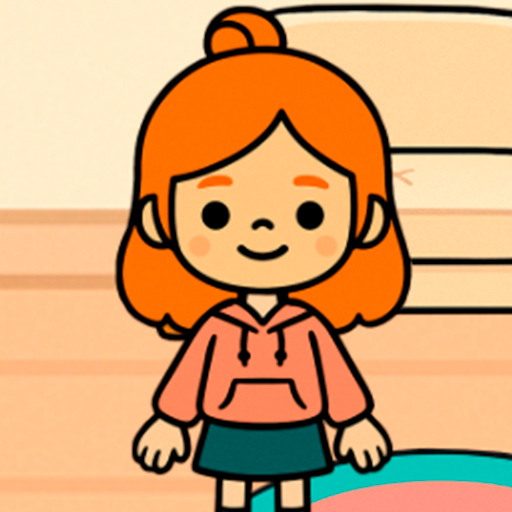
Avatar World combines character styling with digital dollhouse play. You choose the people in a scene, arrange the space around them and decide what the next action means. A room can host an ordinary breakfast, an unexpected visit or the first day of a new job. The interest comes from connecting those creative choices rather than chasing a single high score.
Pazu's official Avatar World page identifies the game and its support options. A useful beginning is practical: choose one situation, give each character a purpose and use the objects that make that situation visible. A finished scene needs a clear action more than a large collection of decorations. You can expand the cast and setting once the first interaction is easy to understand.
Gameplay Overview
Avatar World pretend play works through relationships between people, places and props. A cup on a table is decoration until someone is waiting for a drink. A bag beside the door becomes important when a character is about to leave. Give an object a role in the story and its next movement becomes easier to choose.

Begin with two characters and one shared activity. One can prepare something while the other arrives, asks for it or changes the plan. Place them so you can recognise who is doing what. When the action is complete, leave the room in an arrangement that shows the result. This creates a beginning and ending without requiring a long script or a complicated set of rules.
How to Play: Learn One Room First
Open one available room and identify a place to stand, a place to sit and an object you can move. Test each in turn. Move a character to the seating area, bring the prop nearby, then change the character's position. You are learning the room's useful interactions instead of trying to memorise every item before play begins.
Turn that test into a short activity. If the room has a table, prepare a meal or a conversation. If it has a bed and storage, make a morning or bedtime scene. Keep the first project inside that room so you can see how its objects work together. Once the movement feels familiar, add another person or connect the scene to an available neighbouring location.
Controls and Object Placement
Use a mouse or the supported touch controls to select buttons, move characters and place objects. A tap normally chooses a visible option; a drag changes a movable item's position. Start with an object that is not hidden behind another one. Its outline gives you a clear selection target and makes it easier to see whether the game accepted the movement.
Drop the item slowly near its destination. A hand, shelf and floor can produce different placement results, so try an empty surface before assuming the object is broken. If the wrong item moves, separate the overlapping pieces and try again. Small, controlled movements are especially helpful on a smaller display where several detailed objects can occupy a short distance on screen.
Key Features of Pazu's Native Game
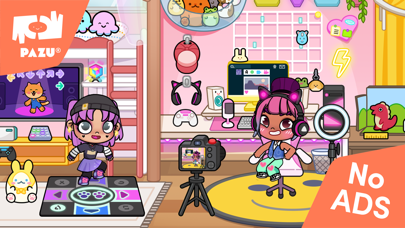
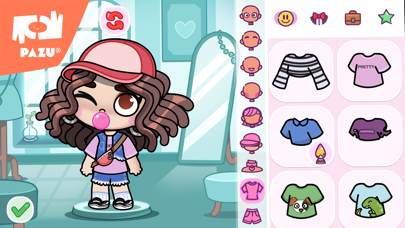
Pazu's Avatar World combines several creative activities:
- Avatar customisation with hairstyles, outfits and accessories.
- Homes that can be designed around a character's daily activities.
- Towns, cities, locations and characters to explore.
- Objects that turn a room into a setting for pretend play.
The official Google Play description names home offices, gyms and music rooms as examples of spaces players can design. Those examples make useful project ideas because each room has a different purpose. A music room needs a place for its main activity and an audience or visitor; a home office needs a working area; a gym suggests a routine that can be acted out.
Connect appearance and setting when choosing a project. Make a character who is preparing for a performance, arrange their practice space, then introduce someone who changes the plan. The clothes, the objects and the room now explain the same event instead of becoming three unrelated decorating tasks.
Give Characters a Clear Role
Choose a role before choosing every detail of an outfit. A host needs a reason to welcome someone; a visitor needs a reason to arrive. These roles create an interaction even before you add dialogue. If both characters simply stand in the same place with no task, the scene can look busy without giving you much to do.
Use one strong visual difference to distinguish the people involved. A bright jacket, a recognisable hairstyle or a repeated accessory can help. Keep that feature when changing the character's outfit for another scene. It becomes a visual reminder of who returned, which is especially useful when you are moving between several rooms or comparing screenshots from a longer story.
Design a Room around an Activity
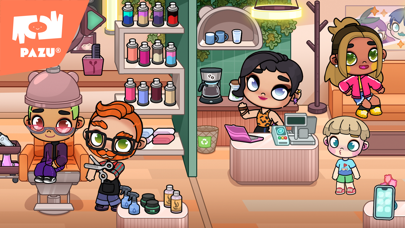
Decide what must happen in the room, then place the largest items around that action. A café needs a preparation area and somewhere for the customer. A study room needs a working surface and space to sit. Test the action before filling the remaining gaps with decoration; otherwise, a route that looks clear in a still image may be awkward to use during play.
Try moving a character with an important prop through the room. If furniture blocks the movement or hides the destination, adjust the layout. Keep a small open area where two people can meet. This gives you a flexible stage for a conversation, a handover or a surprise arrival without rebuilding the entire room for every new scene.
Pro Tips: Keep the Scene Easy to Read
Limit the number of props that compete for attention. If the story concerns a missing bag, make that bag distinctive and keep unrelated luggage out of the main area. If someone is preparing a meal, place the relevant food where the action is visible. A viewer should be able to identify the important object without searching every corner of the room.
Check the scene at the size at which you intend to view it. Small accessories can disappear when a screenshot is reduced, while a large item can hide a face or hand. Move the essential pieces first and inspect the whole composition. Only then add a decorative detail that reinforces the setting instead of distracting from the characters.
Try a Three-Scene Story
Use a simple sequence: preparation, interruption and result. In an Avatar World café story, the first scene might show a worker setting out food. The second introduces a customer with an unexpected request. The third shows how the worker adapts the arrangement. Reusing the same main props makes the change between those scenes easy to follow.
Keep the cast small while learning this structure. Two people can already show agreement, disappointment, surprise and a solution. Adding more characters is useful only when each has a job in the action. A short episode with a clear ending gives you a stronger project to expand than a room full of people waiting for something to happen.
Explore with a Question in Mind
Choose a useful action to discover in a new room: carrying an item, sitting down or putting a prop on a surface. Connect it to a scene immediately. A movable parcel can start a delivery, and a seating area can become a meeting place.
When an object does not support the action you imagined, change the scene or choose a more suitable prop. This keeps exploration connected with the story rather than becoming a long sequence of repeated taps.
Advanced Storytelling: Give Props a Job
An important prop can link several scenes. A bag is packed at home, carried through a departure and opened at the destination. Each movement tells you something about the character's plan. Keep that prop recognisable throughout the sequence so you do not need to explain its identity every time it appears.
You can also change the meaning of a prop without changing the object. A cup can be a gift, part of a café order or an item someone forgot. Establish its meaning through the surrounding action: who placed it, who is waiting and who takes it away. This gives ordinary objects more storytelling value than adding another decoration that nobody interacts with.
Customise for Recognition, Then for Detail
Start with the hairstyle, main clothing shape and largest accessory. These define an avatar's silhouette at the normal playing size. Give a cast one shared detail, such as an accent colour, then vary the large shapes so each person remains recognisable.
Keep a reference before a costume change. A stable hairstyle or accessory can identify a returning character even when their outfit changes for a performance, a visit or a different activity. Small details work best after that identity is clear.
Plan a Small Project You Can Finish
Choose an observable goal: one complete outfit, a room ready for a meal or a three-scene visit. “Prepare a welcome meal” is easier to finish than “make the perfect house” because you can see when the table, food and people are ready.
Stop adding categories once the project works. Review the important action and remove a prop that obstructs it. On the next visit, improve one part or make a sequel instead of restarting every design.
Free Content and Optional Packs
Free-to-start play and optional content purchases should be treated as separate choices. Build your first story with the items you can already access. That reveals whether a new pack would add a genuinely useful setting or simply duplicate an activity you can already stage. You do not need to buy a complete collection before making an enjoyable roleplay scene.
Check the official Avatar World App Store listing for the current iOS product and its purchase information. Prices, promotions and availability can change by platform and region, so avoid planning around a fixed offer quoted elsewhere. Any account or purchase action belongs in the supported app and store process, not inside a lookalike payment prompt on an unrelated page.
Purchases, Progress and Moving between Devices
Before changing devices, distinguish a purchased pack from a saved room arrangement or a character design. These are different kinds of information, so recovering one does not automatically establish that every part of a world has transferred. Keep a visual reference for an important scene and use the official account instructions for purchases.
Pazu's Avatar World purchase-restoration information explains the relevant store-account and restore-purchases route. Use that specific process when content bought in the app is missing. Keep receipts and account details private when seeking help, and do not assume that every kind of progress uses the same recovery process.
A Three-Object Creative Challenge
Pick three ordinary props and make each necessary to a scene. A bag, a snack and a seat can tell a departure story: the snack is packed, the bag is carried and the character waits. Remove one item and ask what becomes less clear. That test shows whether the prop is doing a real job or merely filling space.
Repeat the challenge with a different action while keeping the same three objects. They might now belong to a picnic or a visitor arriving for lunch. Reusing a small set of props encourages you to think about movement, character intention and setting. It also makes the challenge practical with a small prop collection.
Similar Games for Pretend Play
Choose a digital dollhouse game when you enjoy moving characters and objects through places. Choose an avatar creator when you prefer experimenting with appearance. Toca Boca World is a useful comparison for home design and everyday roleplay, while Gacha Life and Gacha Club focus more closely on anime-style characters and scenes.
Give the next game a specific purpose: a character reference, a room idea or a short roleplay episode. This makes the choice more useful than relying only on familiar colours or artwork. You can also visit Pazu's official game catalogue to compare the developer's other creative apps and their different activities.
Browser games in this collection
- Avatar World City Life — Explore a character-led city-life setting in a third-party browser game. The attraction is arranging everyday scenes and deciding what the inhabitants do, rather than completing a timed reflex challenge.
- Avatar World: Your House — Focus on a house as the stage for character stories. This browser title is a close thematic choice for players who enjoy a dollhouse setting, domestic objects and choosing a role for each inhabitant.
- Avatar World Secrets — A Yiv.Com browser title about arranging a room, dressing an avatar family and making up a life story. Its mix of setting and character choices is a close fit for dollhouse players.
- Avatar Life My Town — A casual home-story simulator with characters and everyday scenes. It is related by pretend-play mechanics, with no verified Pazu or Toca affiliation.
- TB Avataria Life Girl — A home-decoration and clothing game with keyboard movement listed. Its own currency and progression belong to this browser release.
- Toca Boca and Avatar Mix — A franchise-labelled browser mix is best approached as its own character-and-scene game. The title points towards the same dollhouse storytelling interests as Toca and Avatar: recognisable characters, places to put them and small everyday situations.
History and Updates
Avatar World is developed by Pazu Games. Use the product page and current official store information for releases and compatibility. Older videos can offer useful story ideas even when their locations or menus differ from yours.
Keep the actors' roles and the scene's purpose consistent when replacing an unavailable prop or adopting a new room. This lets a project grow with the available tools rather than depending on one exact screenshot.
Let a Small Idea Become a Finished Scene
Play Avatar World online by choosing one room, two characters and an event they can act out. Make the important movement visible, give props a purpose and finish with an arrangement that shows what happened. These small decisions create a story even when the available tools are simple.
For your next visit, improve one recognisable part of the project: a clearer outfit, a more usable room layout or a better ending. A collection of finished scenes gives you more to enjoy and build on than an endless series of unfinished decorations.
Frequently asked questions
What is Avatar World about?
Avatar World is Pazu's character-customisation and pretend-play game. Create people, arrange places and act out stories using objects, homes and locations.
What can I customise in Avatar World?
The official game description includes hairstyles, outfits, accessories and homes. Design choices become more useful when they connect with a character's role and the activity you want to stage.
How do I move objects?
Use the supported direct controls to select and drag an active object. Begin with a clear surface and move slowly near the destination so you can place it without confusing overlapping items.
What is an easy Avatar World roleplay idea?
Make a three-scene visit: prepare the room, bring in a visitor and show how the host responds. Two characters and an important prop are enough for a readable beginning and ending.
How can I make my characters easy to recognise?
Give each person a distinctive hairstyle, clothing shape or accessory. Keep that feature consistent when changing outfits or moving the cast between rooms.
How should I plan a house in Avatar World?
Choose the activity first, place the large furniture and leave a usable route between the important areas. Test the scene before adding small decorations that could obstruct characters or props.
How should I handle missing purchases?
Use Pazu's official restore-purchases information and the store account associated with the purchase. A missing pack is different from a missing room arrangement or character design.
Where can I download the official Avatar World app?
Use the Pazu product page or its official Google Play and App Store links. Confirm the developer and product name before installing or entering any payment information.

Good game? Tell us.0
Share a tip, celebrate a high score, or tell us what you think. Keep it friendly.